Module user guide
Sexual health
A practical guide to recording questionnaires, events and reviewing sexual recovery progress.
Objective
This module helps track recovery of sexual response after surgical, neurological, hormonal or other clinical follow-up situations.
It is designed for both men and women and uses short questionnaires adapted to the follow-up profile.
In this guide
1Data entry
Answer the questionnaire
Data is collected using a five-question questionnaire, each with five possible answers.
From the main screen you can choose the questionnaire type according to the configured profile.
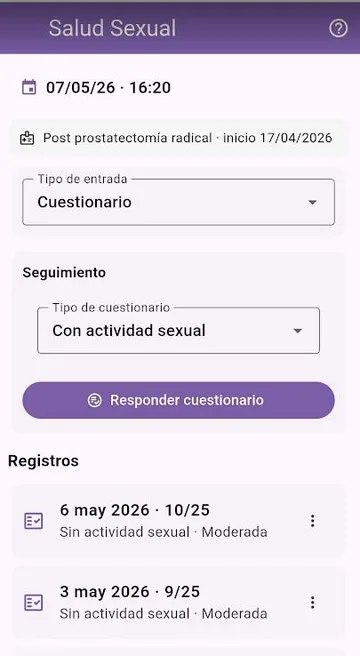
Record events when needed
You can also record events related to the recovery process: starting or ending medication, tests, procedures or important observations.
Events are marked in reports and help interpret progress more clearly.
2Initial setup
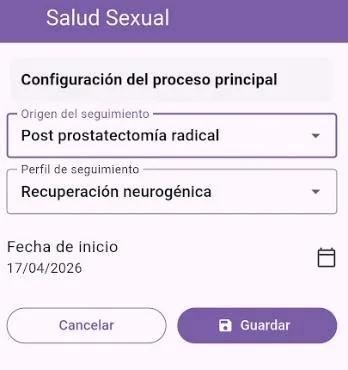
Define the follow-up process
Enter the main reason for follow-up, such as surgery, radiotherapy, hormone treatment or sexual dysfunction, and set the start date of the observation period.
You can also select the follow-up profile: neurogenic, hormonal, sexual function recovery or other available profiles.
3Reports
Results and assessment
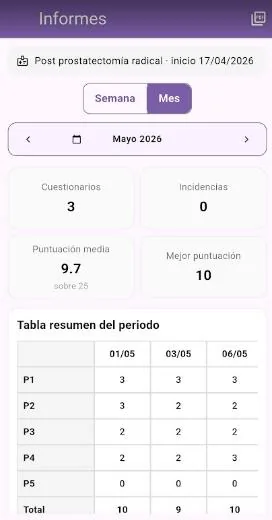
In the reports screen you can filter the period, view totals and review the questionnaire results table.
An assessment table is also shown to help interpret scores as guidance.
You can export the report as a PDF using the export icon.
4Charts
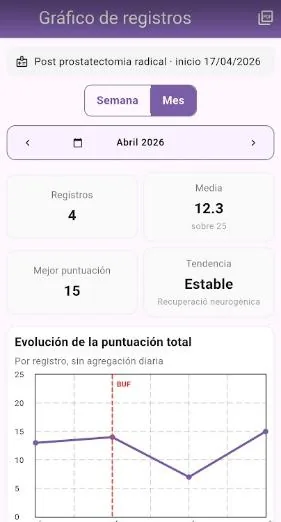
Visual progress
Charts follow the same criteria as reports: you can select periods and view score progression.