Module user guide
Kegel exercises
A practical guide to start exercises, configure timers and track consistency.
Purpose
The Kegel module helps you track and perform exercises to strengthen the pelvic floor.
Unlike other modules, its main goal is not to collect medical data, but to support training and consistency.
In this guide
1Starting an exercise
Choose the exercise type
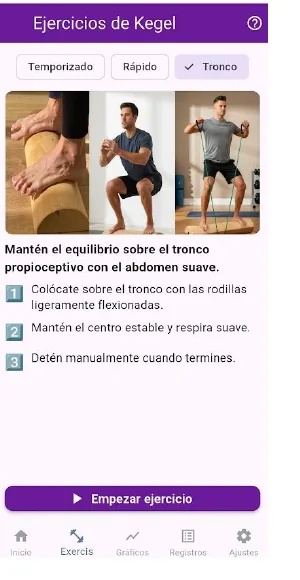
You can use timed exercise, quick exercise or proprioceptive trunk work, depending on the type of training you want to do.
- Timed: guided cycles with inhale, contraction and rest.
- Quick: shorter contraction and relaxation cycles.
- Trunk: free stopwatch without guided cycles.
Follow the timer
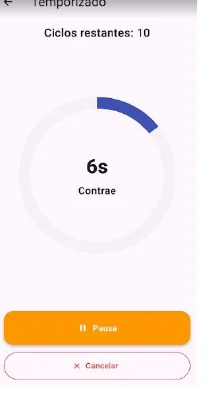
When the exercise starts, the screen shows the remaining time for each phase and lets you pause, resume or cancel.
Each phase has a different sound so you can exercise without constantly looking at the screen.
2Settings
Times and cycles
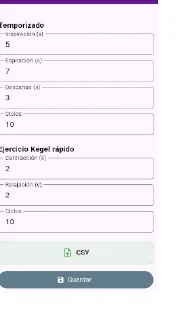
From settings you can configure the seconds for each phase and the cycles for timed and quick exercises.
You can also export records in CSV format.
3Records
View and edit sessions
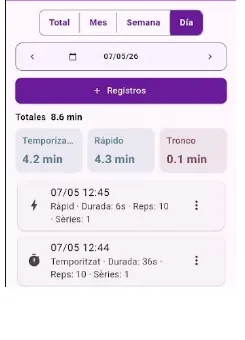
In the records screen you can view all saved sessions and filter them by day, week, month or total.
- Add new records.
- Edit or delete existing records.
- View total minutes by type and period.
4Charts
Tracking consistency
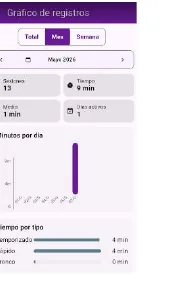
The charts screen lets you select periods and view total minutes by day and exercise type.