
An app from the PACientActiu ecosystem
Install PAC-NUTRI
No app store needed: it installs from the browser and updates itself.

PAC-NUTRIAndroid · iPhone · computer · from the browserApp address: nutri.pacientactiu.comOpen PAC-NUTRI

How to install
Android
- Open the address in Chrome.
- Tap the ⋮ menu and choose Install app (or Add to home screen).
- The PAC-NUTRI icon will appear with your other apps.
iPhone and iPad
- Open the address in Safari.
- Tap the Share button (the square with the arrow).
- Choose Add to Home Screen.
Computer
- Open the address in Chrome or Edge.
- Click the install icon in the address bar.
- It opens in its own window, like a program.
When a new version is available, the app shows A new version of PAC-NUTRI is available: tap Update.
User manual
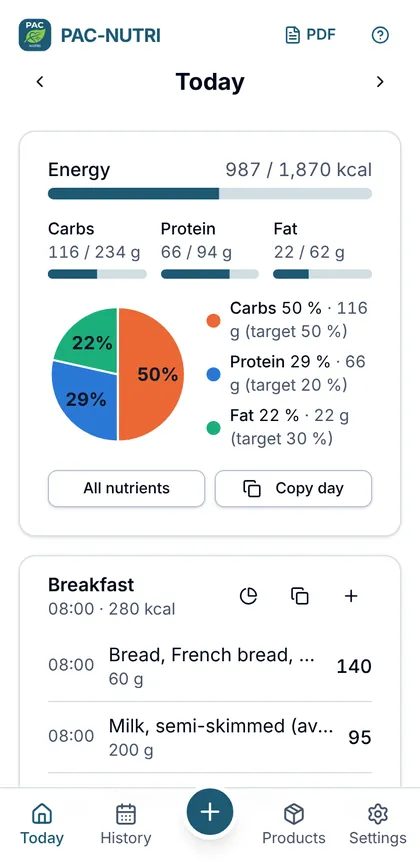
Step-by-step guide with screenshots of every feature. It also opens from the help icon in the app.
Your data
- No accounts or sign-up: data is stored only on your device and is not sent to any server.
- If you clear the browser data or uninstall the app, it is lost. Make backups in Settings → Your data → Backup and keep them wherever you like (Drive, Dropbox, email…).
- Barcode lookups in Open Food Facts send only the code number.
A tool to stay informed, not a treatment
PAC-NUTRI calculates from food composition tables and what you log. It does not calculate medication doses or make therapeutic recommendations: discuss the results with your healthcare team.
Sources: Anses-Ciqual 2025 (Licence Ouverte/Etalab) · Open Food Facts (ODbL).